- Project type
- B2C Web platform
- Duration
- September 2020 — Feb 2021
- Tools and skills
- Figma, Adobe Xd, Illustrator along with an in-depth study of data visualization techniques and principles of communication design.
- Client
- UNI.xyz
- Status
- Live
Overview
Introduction
Dashboards on UNI platform were envisioned to be a one-stop destination for all statistical information regarding a particular entity. Since UNI has multiple features for varying user groups, one dashboard for all didn’t seem like a workable solution. So the project was to create a dashboard layout along with design guidelines which could be used anywhere by making minor tweaks.
Context
Background
For me, dashboards are one of the most interesting problems of communication design. There is data which needs to be communicated and there’s a user who is interested in the story. The entire game is to find an equilibrium between the capacity and limitations of the user with the information to form a narrative. A dashboard is not limited to colorful charts, bold text and quirky illustrations. It’s a canvas where a story is told.
Task
The task was to create a dashboard for conveying statistical information to the users.
My role
Responsible for the entire design grounds up from ideation to developer handoff.
Research
Case study
While the initial study of projects did help, I still needed a solid case study to further analyze the needs and expectations, collect design ideas and finding patterns. For the purpose, I studied dashboards of Medium, Behance, Instagram and Google Analytics. While there were notable differences between dashboard of Google Analytics and the other three in terms of usage, depth and complexity, there were many interesting observations which helped me step towards my own design solution.
Findings
- User is interested in metrics, which can be directly or indirectly controlled by or an outcome of his/her actions. Anything apart from that is secondary/ unnecessary.
- Graphs do communicate large amounts of data effectively but also add to the cognitive load. Thus they must be used only when absolutely necessary. Key metrics can also be presented in textual format.
- Data is addictive.
Process
Approach
To initiate the process, I began by studying multiple projects shared on Behance and Dribbble for inspiration. Soon I realized that in dashboard design, the visuals often tend to take form or art than serving a purpose. Where on a fundamental level, the function of a chart is to represent data in an easily understandable format, some projects used complex charts, purely for aesthetic reasons. Thus, I took the challenge of deviating from the common practice and presenting data in a simple and understandable format as possible. If simplicity comes at a cost of aesthetics, then be it.
Process
To being with, I made a table of all data points we could and wished to present to the user and sorted them on basis of products and use case.
Upon then we fixated on ways to represent each metric, weeded out things that were extra/ irrelevant for users. Finally, I worked on clubbing similar data points together to make a cohesive visual comparison.
Outcome
Final design
Since we needed multiple dashboards at various places on platform and more such pages were expected to come up in future, I decided to develop a unified layout which could work in all places with minor or no tweaks.
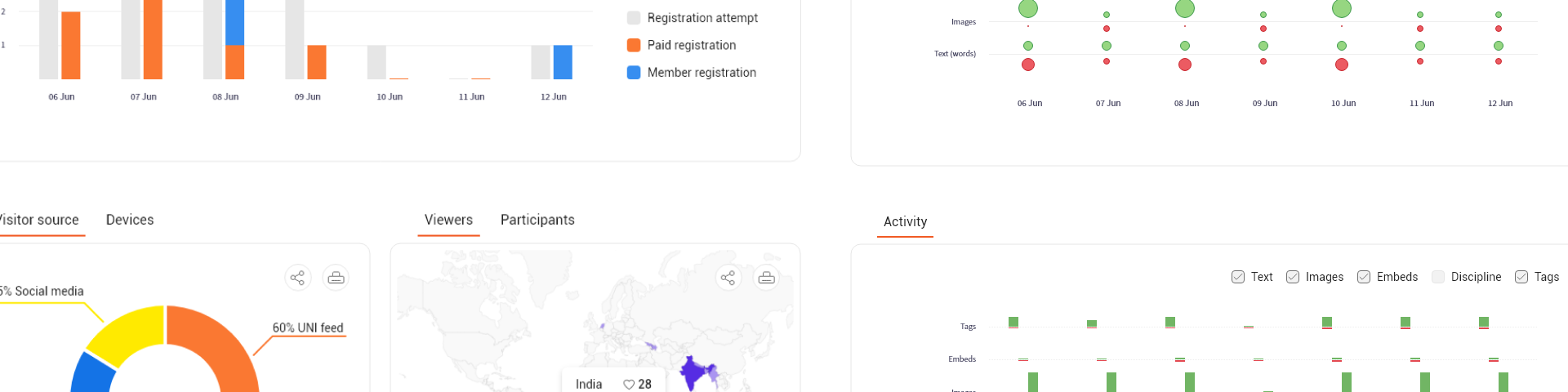
After pondering over the findings followed by a series of iterations, I landed upon a design solution which did check most of the requirement boxes. Without compromising much on aesthetics, the solution allowed a user to understand the metrics without taking a course in data visualization.
Here the key matrices which a user might want to check frequently are provided at top in textual format. The detailed stats are represented with the help of graphs below. To make it clean and less daunting, related matrices are clubbed together. Share and export functionality is provided to allow users to export a copy and share it wherever it deems fit.
Learnings
Although the dashboard design met all of our expectations and serves the purpose, I can foresee the need of more complex and more powerful dashboards in near future and it'll be a challenge to adapt to all those requirements. Through this project I got a chance to study visual communication and data representation techniques. However, most important was how people understand and interpret data.