Raising the bar for Windows craft
A dark-mode brief became a reason to rethink scope, build tools, and work beyond the design file.
- My role
- Sole designer
- Partners
- PM & engineering
- Phase 1
- May'25 – Oct'25
- Phase 2
- Nov'25 - Sep'26
Some work mentioned in this project is still unshipped so corresponding implementation details are withheld.
The brief was one dialog. The opportunity was bigger.
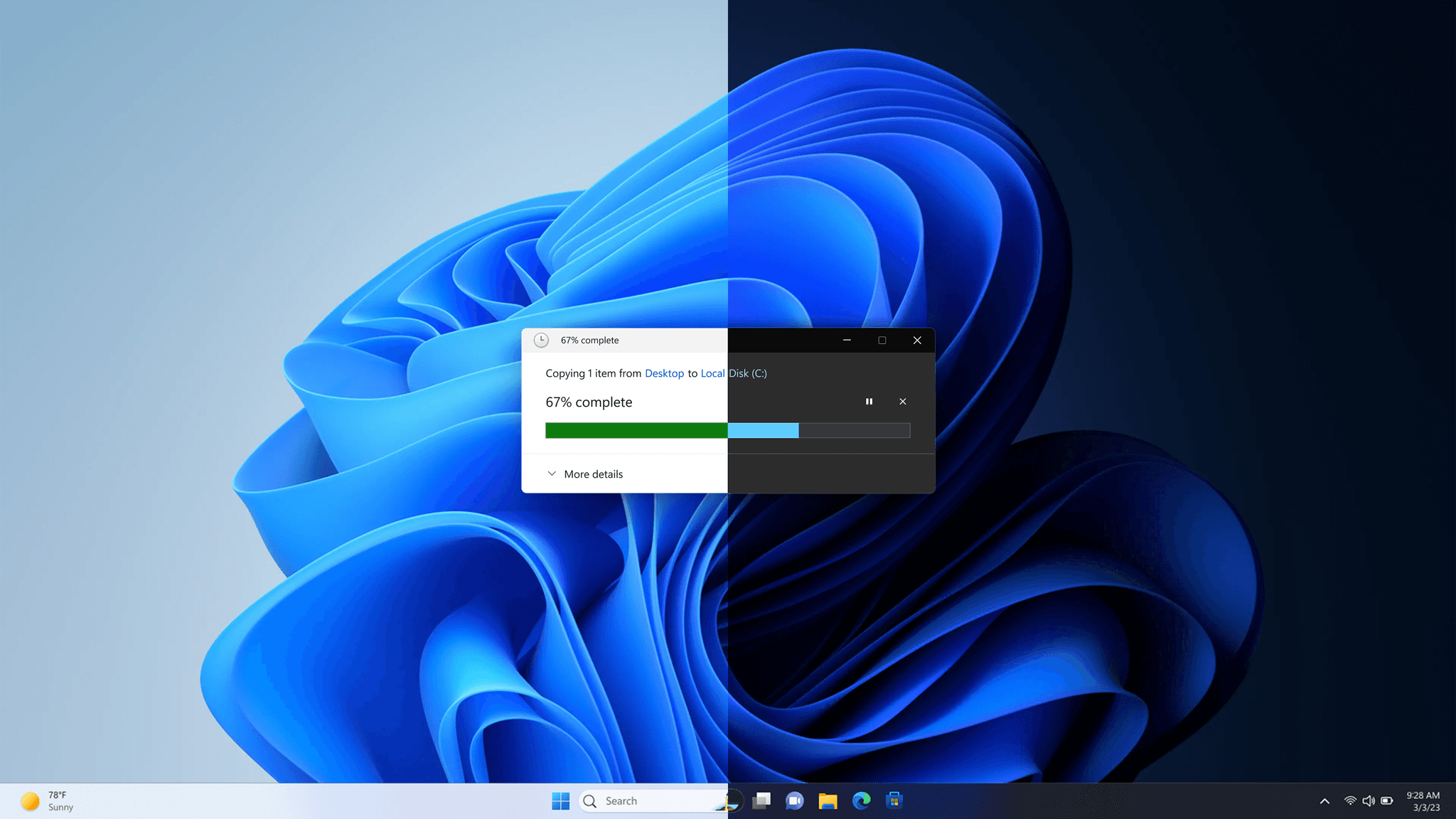
My first task in a larger Windows craft initiative was straightforward: bring dark mode to the Copy dialog. <add-space-for-screenshot> But a darker dialog would not, by itself, be enough. The surrounding flow was inconsistent, the underlying framework was old, and even producing the design spec involved repetitive manual work.
This is the story of how I kept questioning the boundary of the task: what users actually needed, what we could improve within the constraints, what can we do to remove the constraints and what I could build myself when the tools were missing.
01
Question the scope
Take responsibility for the experience, not just the assigned screen.
- Move from an isolated dialog to a complete file-transfer scenario.
02
Protect the craft
Work with real constraints without treating them as permission to stop caring.
- Explore modernization, then make the chosen legacy approach workable.
03
Build what is needed
Step outside the design file when a tool or a working prototype can move the work forward.
- Create plugins, publish WinUI3 AI skills, and help others use them.
01 / Premise
Windows 11 launched in 2021 with the promise of a modern, polished OS. By 2025, many legacy surfaces still looked and behaved like earlier versions. Some did not follow system preferences while others had accessibility issues. These all were negatively impacting the user and market perception of Windows11
An internal research connected craft to purchase intent for a new device. Customer satisfaction signals and recurring public criticism also pointed to the gap. A prioritized backlog of legacy surfaces was created, and the Copy dialog became my starting point.
A light dialog in a dark experience
Screenshot to be addedWhy craft deserved attention
Screenshot to be added02 / Approach
The Copy dialog lived in an older UI framework without automatic support for dark mode, text scaling, and related system capabilities. I proposed migrating to a modern framework and rethinking the surface, rather than only changing its colors. My explorations gave the team something concrete to use in engineering-cost discussions.
The alternative was to add dark mode to the existing framework. Engineering cost and timelines made that the chosen route. It was not the approach I favored: it left the deeper modernization problem unresolved. But disagreeing with the direction did not remove my responsibility to make the experience better within it.
Modernize the surface
Screenshot to be addedImprove within the existing framework
Screenshot to be addedThe smaller design ask still had a tooling problem
There was no existing design spec to build on and no variable-based component library for this work. This meant I had to reconstruct legacy surfaces and create dark-mode variants manually which was a lot of manual effort. I decided to address that problem rather than simply accepting it.
I built and shared Figma plugins with the team. Mode switch converted assets between light and dark treatments using the Windows style guide. Alpha picker helped recover color and opacity combinations from screenshots when the original design files did not exist. These along with multiple other internal plugins and tools were created to address specific obstacles in the work.
Mode switch
Screenshot to be addedAlpha picker
Screenshot to be added03 / Opportunity
Updating only the Copy dialog would create a “zebra effect”: a dark progress dialog followed by a light conflict or confirmation dialog. The inconsistency would move to the next step rather than disappear. From the user's perspective, it was still one task.
I mapped the connected surfaces and pushed for High Value Scenarios (HVS) to guide prioritization. Instead of asking which dialog to update next, I wanted us to ask which complete user scenario we could make consistent. I took that argument from my immediate team to Windows leadership.
The scope expanded beyond the Copy dialog to copy, move, delete, and restore. I also built a Scenario Map visualization tool to make the relationships visible and support scope discussions. The important shift was not the number of screens; it was the unit of responsibility.
From one dialog to an end-to-end scenario
Screenshot to be addedPhase 1: Outcome
The dark-mode work for the file-transfer scenario shipped as internal release around end of 2025 and was made generally available in 1st quarter of 2026.
The work received positive media coverage and leadership appreciation, and helped make the case for better resourcing of subsequent modernization work. Interestingly, critique called out how Windows solved for entire flow inconsistencies rather than just individual screens. After a cool-off period, we no longer get user complaints on this front. For me, the more useful lesson was that a change in problem framing paved way to change how the team delivered quality.
A consistent file-transfer experience
Screenshot to be addedThe conversation after shipping
Screenshot to be added04 / Moving forward
Phase 2 followed the first phase and ran through September 2026. It extended the same question: how could I help modernize legacy Windows experiences, not just describe what they should become? Much of this work is still unshipped, so this chapter stays at the level of contribution and process.
Solve for the challenges faced in Phase 1
Still unhappy with the fact that we couldn't take modernization approach for copy scenario given high engineering cost,I developed and published AI skills for generating WinUI 3 versions of legacy Windows apps and new concepts. This meant working beyond visual specifications and into functional, native implementation. An idea that started as a hack resulted in a set of reusable skills that helped cut development time by 30% while improving craft quality. It also enabled other designers in the team to prototype in native without relying on engineering availability.
The Windows design team now uses these skills for prototyping, and engineers use them to generate frontend code. After I published the initial skills, UX engineering took them forward for further refinement. My contribution was creating and proving the starting point, and letting the experts take it forward.
From a concept to a native WinUI 3 surface
Screenshot to be addedEnter password to view this section
This section is shared on request. The rest of the case study is public.
Looking back
I could not remove every framework constraint or own every next step. What I could do was make the gaps visible, argue for a more complete experience, and build practical ways around the obstacles I encountered.
That is the thread through both phases: take initiative beyond the assigned task, stay accountable to the user's experience, and learn enough outside my discipline to move the work forward. The dialog was the starting point, not the boundary.